
Held orders
When you reach your plan’s monthly COD order limit, the app doesn’t refuse new orders or lose them. Customers can still order through the COD form, and their orders are held until you can take them.
How you’ll know
A yellow banner appears at the top of the Dashboard, for example 3 COD orders are on hold.

Release held orders
You have two options:
| Option | What happens |
|---|---|
| Upgrade your plan | Click Upgrade plan in the banner. Held orders are created in Shopify within 5 minutes. |
| Wait for the reset | Held orders are created automatically when your monthly limit resets next month. |
Either way, nothing is lost: every held order reaches Shopify with the customer’s details as they entered them.
Customers don’t see that their order is held. If you expect to hit your limit often, upgrade before a sale or ad campaign so orders reach you straight away.
Held orders that could not be created
Sometimes a held order can’t be created in Shopify, even after your limit allows it. These appear below the banner under Held orders that could not be created, with the customer, phone, when it was held and the Reason.
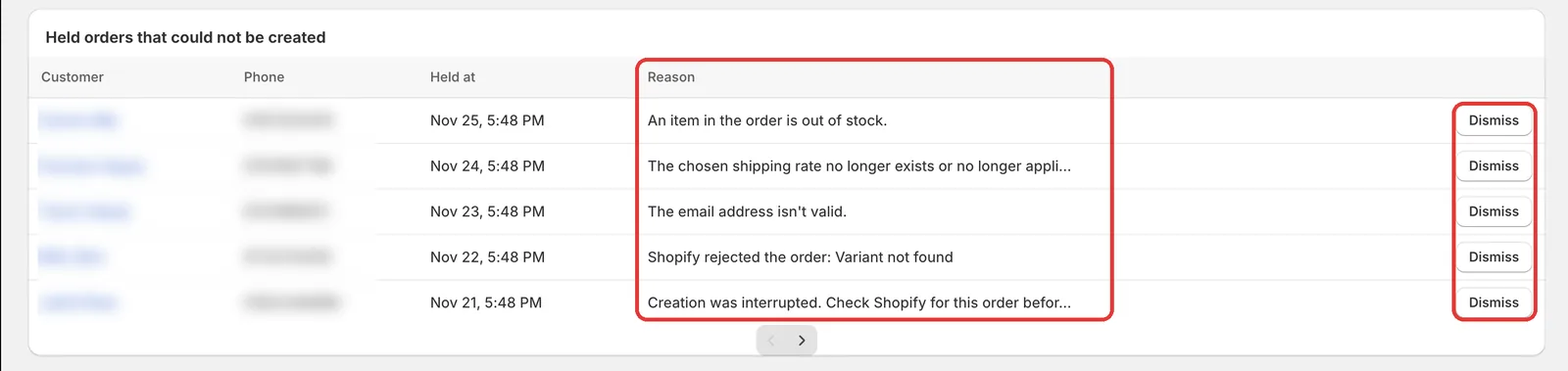
| Reason | What to do |
|---|---|
| An item in the order is out of stock | Restock the product, or contact the customer to offer something else. |
| The chosen shipping rate no longer exists or no longer applies | The rate was deleted or changed. Check your shipping rates, then create the order by hand. |
| The email address isn’t valid | Call the customer for the correct email, or create the order without it. |
| Shopify rejected the order: Variant not found | The product variant was deleted. Create the order with a current variant. |
| Creation was interrupted | Check Shopify first: the order may already exist. Only create it again if it’s missing. |
Click a customer’s name to see their details, then create the order yourself with Create order on the Dashboard. Once it’s handled, click Dismiss to remove it from the list.
Check your usage
The Dashboard header shows this month’s usage, for example Orders: 210 | Labels: 18 | Invoices: 264. To compare plans and limits, see Plans and billing.